Debt Blaster for Windows

A clear plan beats guesswork.

Debt Blaster helps you organize your debts, compare payoff strategies, and follow a month-by-month plan from your Windows computer.

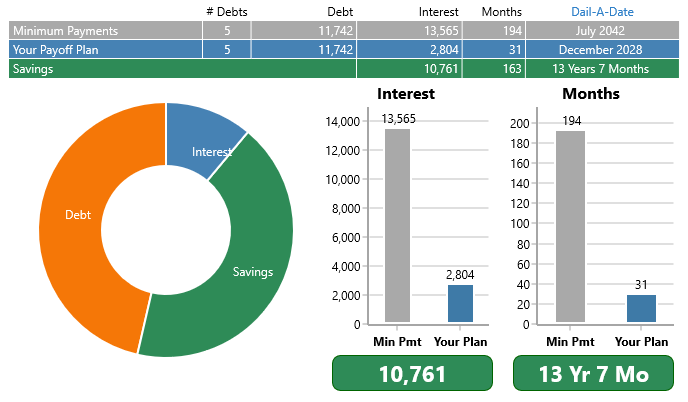
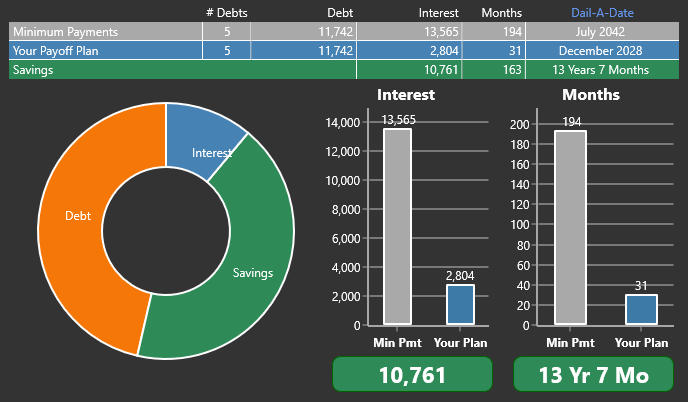
Light themed dashboard preview Dark themed dashboard preview
Debt Blaster for Windows dashboard showing debt payoff savings, interest, and months remaining

Stop guessing. Start planning.

Built by ZilchWorks, helping people build clear payoff plans since 1991.
Quick answer

Debt Blaster is a debt payoff planner, not debt relief.

Enter your debts, choose a payoff strategy, add one-off payments, and use Dial-A-Date to test a debt-free date. Debt Blaster does not lend money, negotiate debt, or connect to your bank. It helps you build and follow the payoff plan.

Use it to Build a payoff plan
Compare Snowball, Avalanche, Custom
Look ahead with Dial-A-Date
Work in Light or dark theme
Product tour

What Debt Blaster does.

Start with the debts you have, choose the strategy that fits, then follow the plan month by month.

Build your payoff plan

Put the moving parts of your debt payoff in one place.

Start with the details Debt Blaster needs to build your plan: when the plan begins, which payoff method you want to follow, what you owe, and whether extra money should be included along the way.

  1. 1Set the plan name, start month, payoff strategy, and pledge money.
  2. 2Enter each debt with type, APR, balance, and payment.
  3. 3Add one-off payments when extra money should be part of the plan.
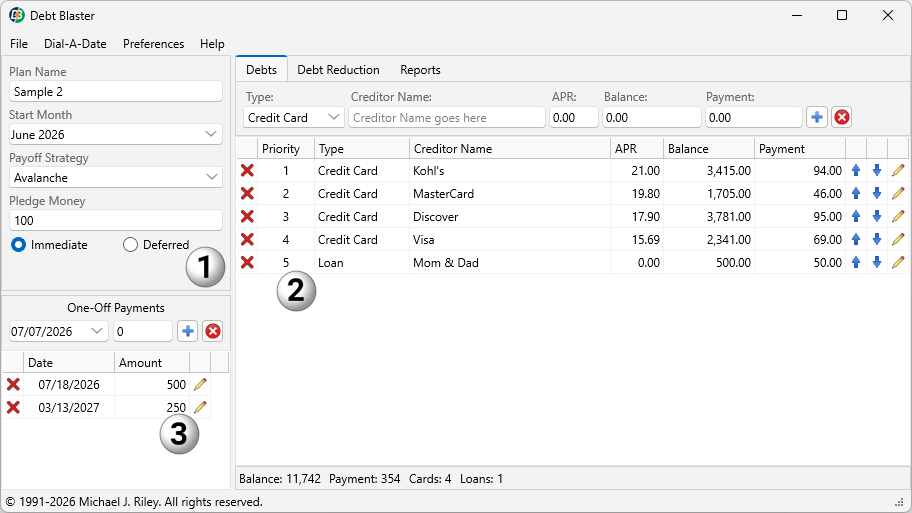
Debt Blaster for Windows plan builder with numbered callouts for plan settings, debt entry, and one-off payments

Plan setup, debt list, and one-off payments live together in the plan builder.
See the Quick Start Guide to learn more
Snowball

Focus on smaller balances first so debts can start disappearing sooner.

Avalanche

Focus on higher interest rates first when interest savings matter most.

Custom

Choose the order yourself when real life does not fit a formula.

Choose your strategy

Compare the payoff method before you commit to the plan.

Snowball, Avalanche, and Custom payoff methods can produce different timelines, interest totals, and emotional wins.

Debt Blaster helps you compare the plan instead of guessing which method fits.

  • Use Snowball when early wins matter.
  • Use Avalanche when interest savings are the priority.
  • Use Custom when you need your own payoff order.
Dial-A-Date

Pick a debt-free date. See what it takes.

Most payoff tools start by asking what is left over.

“How much extra can you pay?”

Dial-A-Date starts with the finish line you want.

“When do I want to be debt-free?”

Choose the target month and year, then see the monthly extra payment needed to reach that date.

  • Move the date sooner or later and see the pledge change.
  • Test a finish line before committing to it.
  • Turn a vague someday goal into a date you can plan around.
Target payoff date
June 2028
Monthly extra payment needed Calculated for you
1

Pick the date

Choose the target month and year.

2

See the pledge

Debt Blaster calculates the monthly extra needed.

3

Adjust the plan

Try a different date until the plan feels possible.

Tax refundApply it once and see what changes.
Extra
BonusTest a lump sum before it disappears into the month.
One-off
Found moneySee how an occasional payment can move the timeline.
Planned
Extra payments / one-off payments

See what extra payments do before you spend them.

A refund, bonus, side job payment, or other lump sum can change a payoff plan. Debt Blaster lets you add those payments and see the effect.

That turns extra money from a guess into a plan decision.

  • Add one-off payments to your plan.
  • See how they affect payoff timing and interest savings.
  • Use occasional money with a clearer purpose.
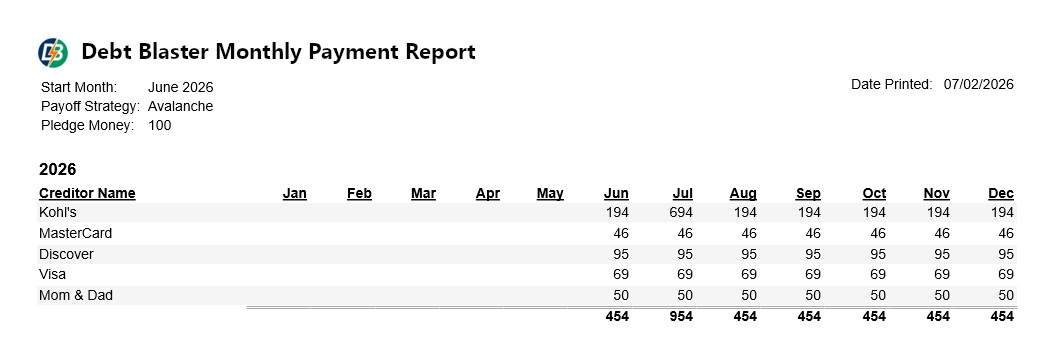
Month-by-month roadmap

Follow the plan one month at a time.

Debt Blaster turns your payoff strategy into a month-by-month roadmap so you can see what to pay and when debts are expected to fall away.

It is easier to keep going when the next step is clear.

  • See the expected payoff month for each debt.
  • See how pledge money changes the timeline.
  • See how much interest the plan may save.
Debt Blaster monthly payment report showing a month-by-month payoff schedule

The schedule turns the strategy into monthly action.

Light and dark themes

Choose the view that fits the way you work.

Debt payoff planning takes focus. Debt Blaster includes light and dark themes so you can work in the view that feels most comfortable.

  • Use the light theme for a clean, familiar workspace.
  • Switch to dark mode when you want a softer screen.
  • Keep the same payoff tools and strategy choices in either view.
Debt Blaster dashboard shown in the light theme
Light theme
Debt Blaster dashboard shown in the dark theme
Dark theme

Built by ZilchWorks. Backed by decades of payoff-planning experience.

Debt Blaster is the clearer new name for payoff-planning software from ZilchWorks.

1991 Helping people build better payoff plans since 1991
16,000+ Users have used ZilchWorks payoff-planning software
$114M+ Debt eliminated by users over the years
Local Plan from your computer without connecting bank accounts

Get Debt Blaster for Windows

Try it first, or buy the full Windows version when you are ready.

$79.95 One-time Windows purchase. No monthly subscription.
Try now

Try Debt Blaster for Windows

Free trial

Download the Windows trial and see whether Debt Blaster fits the way you want to plan your payoff.

Download Windows Trial
FastSpring

Buy from FastSpring

$79.95

Buy directly through the ZilchWorks / Debt Blaster checkout partner.

Buy from FastSpring

Quick answers before you choose

The Windows page is for people who want payoff-planning software. It is not a loan, debt settlement program, or credit repair service.

No. Debt Blaster is payoff-planning software. It does not lend money, negotiate debt, repair credit, or connect to your bank.

Yes. The Windows trial lets you try the payoff-planning workflow before buying the full version.

Dial-A-Date lets you choose a target debt-free month and see the monthly extra payment needed to reach that date.

No. Debt Blaster is built around local planning from your computer. You enter the debts you want to plan yourself.

No. Debt Blaster for Windows is sold as a one-time purchase. The current price is $79.95.

© 2026 ZilchWorks. All rights reserved.